Website Speed Optimization Guide: How to Make Your Website Faster in 2026
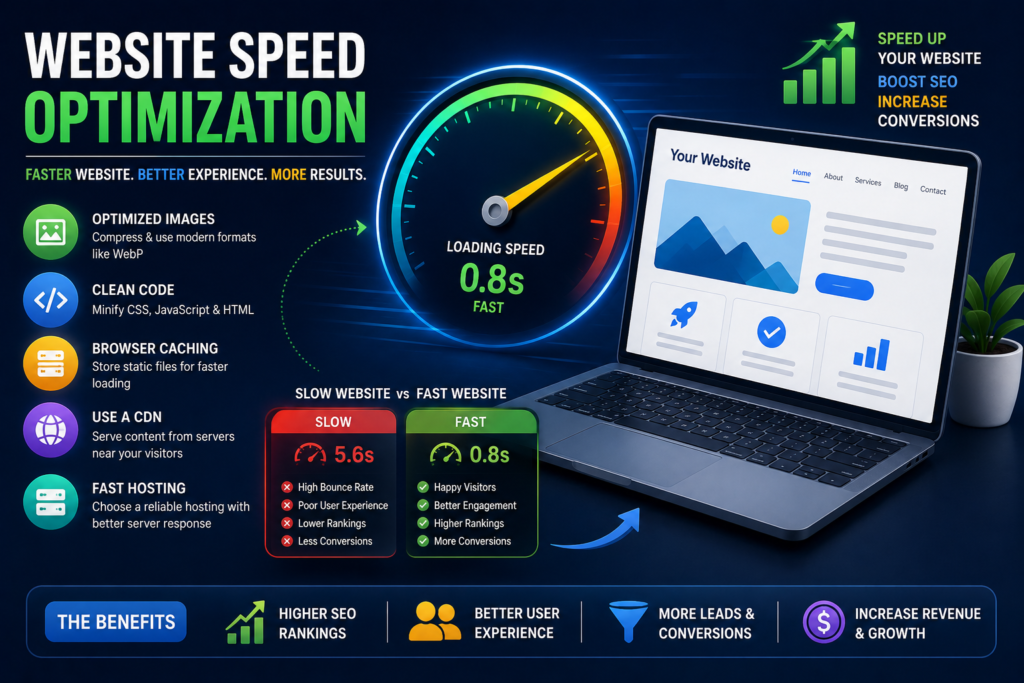
A slow website can quietly cost your business visitors, leads, sales, and search visibility.
Think about your own browsing experience. If you click a search result and the page takes several seconds to become usable, you probably won’t wait forever. You may simply go back to Google and choose another website.
That’s exactly what happens to potential customers every day.
This is why Website Speed Optimization is no longer just a technical task for developers. It is an important part of SEO, user experience, conversion optimization, and digital marketing.
A faster website can help visitors find information more quickly, interact with your pages more easily, and complete important actions such as submitting a form, making a purchase, or booking an appointment.
In this Website Speed Optimization Guide, we’ll explain why website performance matters, how to test your website speed, what Core Web Vitals are, and the most effective ways to make your website faster in 2026.
What Is Website Speed Optimization?
Website Speed Optimization is the process of improving a website’s performance so that its pages load and respond as efficiently as possible.
It involves optimizing multiple parts of a website, including:
- Images
- HTML
- CSS
- JavaScript
- Fonts
- Plugins
- Hosting
- Server response time
- Caching
- Content delivery
- Third-party scripts
- Mobile performance
The objective isn’t simply to achieve a perfect score in a speed-testing tool.
The real goal is to provide a fast, stable, and responsive experience for real visitors.
A website can have an excellent technical score but still feel slow to users under certain network or device conditions. That’s why effective website performance optimization combines automated testing with real-world monitoring.
Why Website Speed Matters for Your Business
Website speed affects much more than technical performance.
It can influence how visitors perceive your business and whether they continue interacting with your website.
Website Speed and User Experience
Visitors expect websites to respond quickly.
When a page is slow, users may:
- Leave the page
- Abandon a purchase
- Stop browsing
- Avoid filling out a form
- Choose a competitor
- Have a negative perception of your brand
A fast website creates less friction.
Visitors can quickly navigate between pages, read content, view products, and complete actions.
Website Speed and SEO
Website performance is also relevant to search engine optimization.
Google uses various signals to evaluate page experience, including Core Web Vitals.
However, speed shouldn’t be treated as a shortcut to higher rankings.
High search rankings still depend on many factors, including:
- Content quality
- Relevance
- Search intent
- Website authority
- Technical SEO
- Links
- User experience
The best approach is to optimize speed as part of a broader SEO strategy.
Website Speed and Conversions
A visitor who can’t quickly access your website can’t become a customer.
For businesses, this makes website speed and conversions closely connected.
Improving performance can reduce friction throughout important journeys such as:
Landing page → Product page → Cart → Checkout
or:
Google search → Service page → Contact form → Lead
Even small improvements can be valuable when your website receives significant traffic.
Website Speed and Mobile Users
Mobile users often browse under less predictable network conditions than desktop users.
A website that loads reasonably well on a powerful desktop computer may feel much slower on a mobile device.
That’s why mobile website speed should be a priority.
How to Check Your Website Speed
Before trying to improve performance, you need to understand what’s causing the problem.
Several tools can help you evaluate your website.
Google PageSpeed Insights
Google PageSpeed Insights can provide performance information and recommendations for individual URLs.
It can help identify issues involving:
- Images
- JavaScript
- CSS
- Server response
- Rendering
- Core Web Vitals
Don’t obsess over getting a perfect score.
Use the recommendations to identify meaningful performance improvements.
Core Web Vitals
Core Web Vitals are important user-experience performance metrics.
They focus on:
- Loading performance
- Responsiveness
- Visual stability
The current Core Web Vitals metrics include:
LCP — Largest Contentful Paint
Measures loading performance.
INP — Interaction to Next Paint
Measures responsiveness to user interactions.
CLS — Cumulative Layout Shift
Measures visual stability.
These metrics help you understand how your website performs for real users.
15 Website Speed Optimization Strategies
Now let’s look at practical website performance optimization techniques you can implement.
1. Optimize and Compress Images
Images are one of the most common causes of slow websites.
A website may contain large photographs that are much bigger than necessary.
For example, uploading a 5 MB image when the page only needs a 200 KB version creates unnecessary loading overhead.
How to fix it
Before uploading images:
- Resize them appropriately
- Compress them
- Remove unnecessary metadata
- Use responsive image sizes
- Avoid uploading unnecessarily high-resolution files
You can often significantly reduce page weight without noticeably reducing visual quality.
2. Use Modern Image Formats
Traditional formats such as JPEG and PNG are still useful, but modern formats can provide better compression.
Consider using formats such as:
- WebP
- AVIF
Choose the format based on browser support, image type, quality requirements, and your website platform.
For most modern websites, using appropriately compressed modern image formats is an important part of page speed optimization.
3. Enable Browser Caching
Caching allows certain website resources to be stored temporarily so returning visitors don’t have to download everything again.
Resources that may benefit from caching include:
- Images
- CSS
- JavaScript
- Fonts
Proper caching can reduce loading time for returning users and decrease unnecessary server requests.
Caching should be configured carefully so that users receive updated resources when your website changes.
4. Minify CSS, JavaScript and HTML
Websites often contain whitespace, comments, and other unnecessary characters in their code.
Minification removes unnecessary characters without changing how the code functions.
You can optimize:
- HTML
- CSS
- JavaScript
However, don’t blindly minify everything.
Test your website afterward to make sure scripts, menus, forms, animations, and other functionality still work correctly.
5. Reduce Unnecessary JavaScript
JavaScript can make websites interactive, but excessive JavaScript can also slow down rendering and interaction.
Third-party tools are common sources of unnecessary scripts.
Examples include:
- Chat widgets
- Analytics
- Advertising scripts
- Social media widgets
- Tracking tools
- Heatmaps
- Pop-ups
Review your scripts regularly.
If a tool isn’t providing meaningful business value, consider removing it.
6. Remove Unused Plugins and Themes
This is particularly important for WordPress websites.
Installing dozens of plugins can increase:
- Page weight
- Database activity
- JavaScript
- CSS
- Server processing
Don’t keep plugins simply because you might use them later.
Remove plugins and themes you don’t need.
Before deleting anything, make sure it isn’t required by another part of your website.
7. Use a Content Delivery Network
A Content Delivery Network (CDN) stores and delivers website resources from servers distributed across different geographic locations.
Instead of every visitor requesting resources from a single distant server, a CDN can serve cached content from a location closer to the user.
CDNs can be particularly helpful for websites serving users across multiple regions or countries.
8. Improve Your Web Hosting
Sometimes the problem isn’t your website.
It may be your hosting environment.
Low-quality hosting can result in slow server response times, particularly during traffic spikes.
When evaluating hosting, consider:
- Server performance
- Reliability
- Location
- Scalability
- Caching capabilities
- Resource allocation
- Support
For business websites, hosting should be treated as part of your overall performance strategy rather than simply a low-cost commodity.
9. Enable GZIP or Brotli Compression
Compression reduces the size of text-based resources before they are sent to a visitor’s browser.
Common resources that benefit include:
- HTML
- CSS
- JavaScript
- SVG
Brotli can provide strong compression for many web resources, while GZIP remains widely supported.
Your hosting provider, CDN, or server configuration may handle compression automatically.
10. Reduce HTTP Requests
Every additional resource can create work for the browser and server.
A page may request:
- Images
- Stylesheets
- JavaScript
- Fonts
- Tracking scripts
- Videos
- Third-party resources
Reducing unnecessary requests can improve performance.
Start by identifying resources that aren’t essential to the page experience.
11. Optimize Your Website’s Database
Database performance can affect websites that dynamically generate pages.
This is especially relevant to platforms such as WordPress and eCommerce websites.
Possible optimization tasks include:
- Removing unnecessary revisions
- Cleaning unused data
- Optimizing database tables
- Removing expired transients
- Reviewing inefficient queries
Always back up your website before making database-level changes.
12. Improve Server Response Time
A browser can’t render a page until the server starts responding.
Slow server response can be caused by:
- Poor hosting
- Database problems
- Heavy plugins
- Inefficient code
- Excessive server processing
- Poor caching
Improving the underlying infrastructure can therefore be one of the most valuable forms of site speed optimization.
13. Lazy Load Images and Videos
Not every image needs to load immediately.
If an image appears far below the initial screen, loading it immediately can waste bandwidth.
Lazy loading allows certain resources to load closer to when the visitor needs them.
This can be particularly useful for:
- Blog posts
- Image galleries
- Long landing pages
- Product catalogs
However, don’t blindly lazy-load critical above-the-fold content because that can delay important visual elements.
14. Optimize Fonts and Third-Party Scripts
Custom fonts can improve branding but may also introduce additional requests.
Similarly, third-party scripts can increase page weight.
Review:
- Number of font families
- Number of font weights
- Font loading strategy
- External scripts
- Marketing pixels
- Social widgets
Use only what your website genuinely needs.
15. Optimize Your Website for Mobile Performance
Desktop performance doesn’t automatically guarantee good mobile performance.
Test your website on:
- Smartphones
- Tablets
- Different browsers
- Slower connections
Pay particular attention to:
- Large images
- Video backgrounds
- Animations
- Pop-ups
- Navigation
- Forms
- Buttons
Mobile visitors should be able to understand your offer and take action without unnecessary delays.
What Are Core Web Vitals?
Core Web Vitals are a set of metrics designed to evaluate important aspects of user experience.
Largest Contentful Paint (LCP)
LCP measures how quickly the main content becomes visible.
Large hero images, slow servers, render-blocking resources, and inefficient loading strategies can affect LCP.
How to improve LCP
Focus on:
- Faster server response
- Optimized hero images
- Efficient caching
- Reducing render-blocking resources
- Preloading critical resources where appropriate
Interaction to Next Paint (INP)
INP measures how responsive a website is when users interact with it.
Heavy JavaScript can make buttons, menus, forms, and other interactions feel slow.
How to improve INP
Consider:
- Reducing JavaScript
- Breaking up long tasks
- Removing unnecessary scripts
- Optimizing event handlers
- Reducing third-party JavaScript
Cumulative Layout Shift (CLS)
CLS measures unexpected movement of content during page loading.
You’ve probably experienced this:
You try to click a button, but an image loads and pushes the button somewhere else.
That’s frustrating.
How to improve CLS
Reserve space for:
- Images
- Videos
- Advertisements
- Embeds
Also avoid injecting content unexpectedly above existing content.
How to Improve Core Web Vitals
Improving Core Web Vitals requires more than installing a caching plugin.
Start with the biggest problems identified through real-world performance data.
Focus on:
- Server response time
- Critical content
- Image optimization
- JavaScript execution
- Layout stability
- Mobile performance
- Third-party resources
Don’t optimize metrics in isolation.
The objective is a better user experience.
How Website Speed Affects SEO
Website performance is one part of technical SEO and page experience.
A fast website can make it easier for visitors to:
- Browse multiple pages
- Consume content
- Complete actions
- Return to your website
- Engage with your business
But remember that speed alone won’t make a poor website rank highly.
SEO still requires:
- Useful content
- Search intent alignment
- Strong technical foundations
- Relevant keywords
- Internal linking
- Authority
- Quality backlinks
- Good user experience
Think of speed as a foundation, not a replacement for SEO.
How Website Speed Affects Conversions and Sales
Suppose two businesses offer similar services.
One has a fast, easy-to-use website.
The other has a slow website with confusing navigation.
Which one would you rather buy from?
Performance influences the entire customer journey.
A faster website can reduce friction between:
Google search → Landing page → Product/service information → CTA → Lead → Customer
For eCommerce websites, speed can influence:
Product page → Cart → Checkout → Purchase
This is why website speed and conversions should be evaluated together.
Website Speed Optimization for WordPress
WordPress powers millions of websites, but poor configuration can cause performance problems.
Choose Reliable WordPress Hosting
Good hosting provides a stronger foundation for performance.
Use a Caching Solution
Caching can significantly reduce repeated processing and improve page delivery.
Optimize WordPress Images
Compress images before uploading them and use appropriate formats.
Reduce Plugins
Only install plugins that provide genuine value.
Use a CDN
A CDN can improve content delivery for geographically distributed visitors.
Keep WordPress Updated
Keep WordPress, themes, and plugins updated to maintain security, compatibility, and performance.
Always test updates before applying major changes to production websites.
Website Speed Optimization for Shopify
Shopify handles much of the underlying infrastructure, but store owners still have significant control over front-end performance.
Optimize Shopify Images
Large product images can significantly increase page weight.
Use appropriately sized and compressed images.
Reduce Unnecessary Apps
Every app can potentially add code or scripts to your storefront.
Regularly review installed apps.
Optimize Themes
Choose a lightweight theme and avoid unnecessary design elements.
Minimize Third-Party Scripts
Marketing and tracking tools can accumulate over time.
Keep only the tools that provide measurable value.
How to Improve Mobile Website Speed
Mobile optimization should be part of every modern Website Speed Optimization strategy.
Start by testing your most important mobile pages.
Then review:
- Hero images
- Fonts
- Navigation
- JavaScript
- Pop-ups
- Forms
- Product galleries
- Videos
- Third-party scripts
Avoid designing desktop pages first and treating mobile as an afterthought.
Instead, consider mobile performance from the beginning of the design process.
Common Website Speed Optimization Mistakes to Avoid
Even businesses trying to improve their performance can make mistakes.
Chasing a Perfect Speed Score
A score is useful, but real users matter more.
Installing Too Many Optimization Plugins
More plugins don’t necessarily mean better performance.
Optimizing Only Desktop
Always evaluate mobile performance.
Ignoring Third-Party Scripts
Tracking, advertising, chat, and social tools can have a major impact.
Compressing Everything Aggressively
Extreme compression can reduce image quality or break functionality.
Lazy Loading Critical Content
Important above-the-fold content should load quickly.
Ignoring Hosting
No amount of front-end optimization can fully compensate for severely inadequate infrastructure.
Website Speed Optimization Checklist
Use this checklist when auditing your website:
- Test your website with a performance tool
- Review Core Web Vitals
- Compress large images
- Use modern image formats
- Enable caching
- Minify CSS and JavaScript where appropriate
- Remove unused plugins
- Remove unnecessary third-party scripts
- Use a CDN where appropriate
- Review hosting performance
- Enable compression
- Reduce unnecessary HTTP requests
- Optimize database performance
- Improve server response time
- Lazy-load appropriate images
- Optimize fonts
- Test mobile performance
- Monitor real-user performance
- Retest after major website changes
How Fast Should a Website Be?
There isn’t one universal number that guarantees a great user experience.
Your goal should be to make important content available quickly and ensure that interactions feel responsive.
Instead of obsessing over a single loading-time target, monitor:
- Core Web Vitals
- Real-user experience
- Mobile performance
- Server response
- Conversion rates
- Engagement
A useful principle is:
Make the important content appear quickly, make interactions responsive, and prevent unexpected layout movement.
How Long Does Website Speed Optimization Take?
The timeline depends on the condition and complexity of your website.
A simple website with large images may improve significantly after basic optimization.
A large eCommerce website with extensive JavaScript, third-party integrations, custom functionality, and poor hosting may require a much more comprehensive project.
Typical work may involve:
Audit → Identify problems → Prioritize → Implement → Test → Monitor → Improve
Don’t make dozens of changes at once without measuring their impact.
A systematic approach makes it easier to determine what actually improved performance.
Frequently Asked Questions
What is website speed optimization?
Website Speed Optimization is the process of improving a website’s loading performance, responsiveness, and overall efficiency to provide a better user experience and reduce unnecessary delays.
How can I make my website load faster?
Start by optimizing images, reducing unnecessary JavaScript and CSS, enabling caching, improving hosting, using a CDN where appropriate, minimizing third-party scripts, and optimizing mobile performance.
What is a good website loading speed?
There isn’t one number that applies to every website. Focus on delivering important content quickly, maintaining responsive interactions, avoiding layout shifts, and providing a consistently good experience across devices and network conditions.
Does website speed affect SEO?
Website performance is one component of Google’s broader page experience and technical considerations. However, speed is only one part of SEO. Content relevance, quality, authority, technical health, and many other factors also matter.
Does website speed affect conversions?
Yes. Slow or difficult-to-use websites can create friction and increase abandonment. Improving performance can make it easier for visitors to browse your website and complete conversion actions.
How can I improve Google PageSpeed Insights score?
Use the recommendations provided by the tool to identify issues with images, JavaScript, CSS, server response, caching, and other resources. Prioritize meaningful improvements rather than simply trying to achieve a perfect score.
Why is my website slow on mobile?
Common causes include large images, excessive JavaScript, heavy third-party scripts, slow hosting, inefficient themes, and poor mobile optimization.
How often should I test my website speed?
Test your website regularly and whenever you make significant changes to its design, plugins, themes, applications, scripts, hosting, or content.
Final Thoughts: Make Website Speed a Competitive Advantage
A fast website is no longer simply a technical advantage.
It is a business advantage.
When your website loads quickly, visitors can find information faster, browse more easily, interact with your content, and complete important actions with less friction.
That’s why Website Speed Optimization should be part of your ongoing digital strategy.
Start with the fundamentals:
Test → Diagnose → Optimize → Measure → Improve.
Compress your images. Reduce unnecessary scripts. Improve your hosting. Use caching. Optimize your mobile experience. Monitor Core Web Vitals. Remove unnecessary third-party resources.
But don’t stop at a speed score.
The ultimate question is:
Does your website provide a fast, stable, and enjoyable experience that helps visitors become customers?
If the answer is yes, website performance becomes more than a technical metric—it becomes a competitive advantage that supports SEO, user experience, lead generation, conversions, and long-term business growth.
Leave a Reply