WordPress vs Webflow: Which Website Platform Is Better for Your Business?
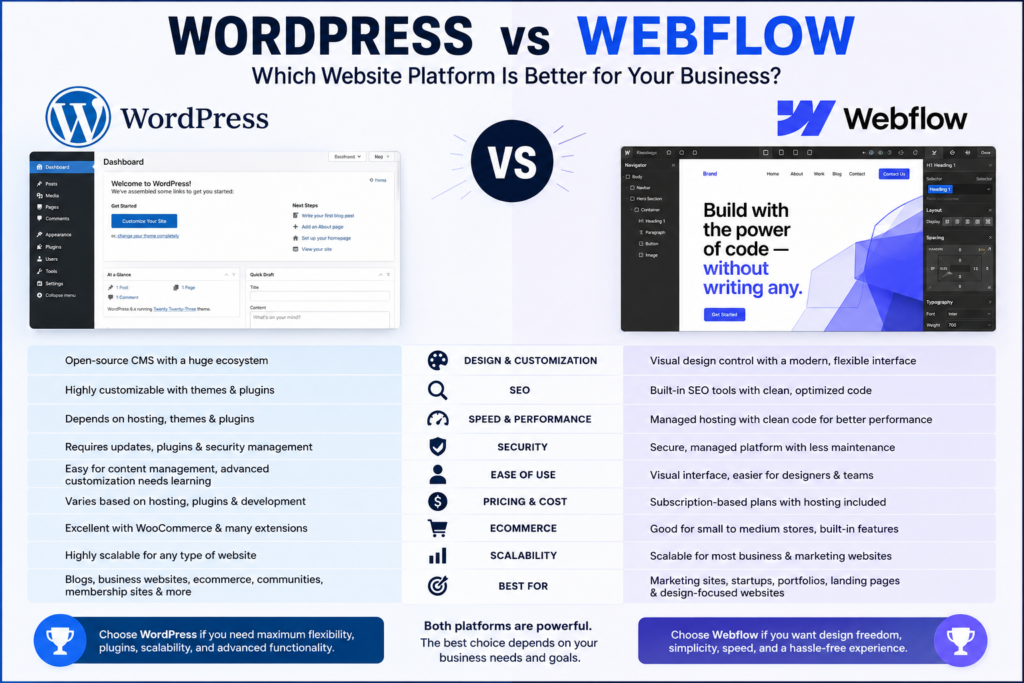
Choosing the right platform for your business website is an important decision. Your website affects your brand image, search engine visibility, customer experience, website performance, lead generation, and long-term growth.
Two of the most popular options businesses consider are WordPress and Webflow. Both platforms can be used to create professional, responsive, SEO-friendly websites, but they approach website development very differently.
So, when comparing WordPress vs Webflow, which one is better for your business?
The answer depends on your goals, budget, technical requirements, design preferences, scalability needs, and how much control you want over your website.
In this guide, we will compare WordPress vs Webflow based on design flexibility, SEO, performance, security, pricing, ease of use, ecommerce, scalability, and overall business requirements.
WordPress vs Webflow: An Overview
WordPress and Webflow are both powerful website platforms, but they are designed for different types of users.
WordPress is an open-source content management system (CMS) that gives businesses extensive control over their website. It has a huge ecosystem of themes, plugins, developers, hosting providers, and integrations.
Webflow, on the other hand, combines visual website design, content management, hosting, and development tools into one platform. It is particularly popular among designers, agencies, startups, and businesses that want highly customized websites without relying heavily on traditional coding.
When comparing Webflow vs WordPress, there is no universal winner. Each platform has strengths and weaknesses.
The better choice depends on what your business actually needs.
What Is WordPress?
WordPress is one of the most widely used website platforms in the world. It started primarily as a blogging platform but has evolved into a flexible CMS capable of powering everything from small business websites to large publishing platforms and ecommerce stores.
One of the biggest advantages of WordPress website development is flexibility.
Businesses can choose from thousands of themes and plugins to add functionality such as:
- Contact forms
- SEO tools
- Ecommerce
- Membership systems
- Booking systems
- Learning management systems
- Marketing automation
- Analytics
- CRM integrations
- Email marketing
- Security tools
Because WordPress is open source, businesses can also customize the code and hosting environment.
This makes WordPress particularly attractive to companies that expect their website requirements to evolve over time.
What Is Webflow?
Webflow is a visual website development platform that allows designers and developers to create responsive websites using a visual interface.
Instead of relying heavily on pre-built themes and plugins, Webflow gives users detailed control over the structure, layout, typography, animations, and responsive behavior of a website.
Webflow is often used for:
- Corporate websites
- Startup websites
- Marketing websites
- Portfolio websites
- Landing pages
- Agency websites
- Product websites
- Content-driven websites
One of Webflow’s biggest advantages is its design flexibility.
For businesses that prioritize a unique visual identity and a polished user experience, Webflow website development can be an excellent option.
WordPress vs Webflow: Key Differences
The biggest difference between the two platforms is their approach.
WordPress provides an open ecosystem where you can combine themes, plugins, hosting, and custom development.
Webflow provides a more integrated environment where design, development, CMS functionality, and hosting are closely connected.
Here is a simplified comparison:
| Feature | WordPress | Webflow |
|---|---|---|
| Ease of use | Easy to moderate | Easy to moderate |
| Design flexibility | Very high | Very high |
| Plugin ecosystem | Excellent | More limited |
| SEO capabilities | Excellent | Excellent |
| Hosting flexibility | Very high | Limited to Webflow ecosystem |
| Custom development | Excellent | Good |
| Ecommerce | Excellent | Good |
| Visual design control | High with the right tools | Excellent |
| Maintenance | Requires ongoing management | Lower maintenance |
| Scalability | Excellent | Very good |
| Best for | Flexible business websites | Design-focused websites |
The right choice depends on which of these characteristics matters most to your organization.
WordPress vs Webflow for Design and Customization
Design is one of the most important areas when comparing WordPress vs Webflow.
WordPress offers thousands of themes and page-building tools. You can also create a completely custom WordPress website using HTML, CSS, JavaScript, PHP, and custom development.
However, the quality of the final result depends heavily on the theme, page builder, plugins, and developer.
Webflow takes a different approach.
It provides designers with granular control over layouts, spacing, typography, animations, interactions, and responsive designs.
This makes Webflow particularly attractive to businesses that want a highly customized visual experience.
Winner: Webflow for visual design control
For highly customized marketing websites and design-focused brands, Webflow has a strong advantage.
However, WordPress can be equally powerful when working with an experienced WordPress development team.
WordPress vs Webflow for SEO
SEO is critical for businesses that rely on organic search traffic.
Both WordPress and Webflow can support strong SEO strategies.
With WordPress, businesses can use SEO plugins and customize important elements such as:
- Page titles
- Meta descriptions
- XML sitemaps
- Canonical URLs
- Schema markup
- Open Graph information
- Redirects
- Internal linking
WordPress also provides access to a large ecosystem of SEO tools.
Webflow provides built-in controls for many essential SEO elements, including page titles, meta descriptions, redirects, sitemap settings, clean URLs, and structured content.
However, SEO performance is not determined by the platform alone.
Content quality, website architecture, backlinks, technical SEO, page speed, keyword targeting, and user experience all matter.
Winner: Tie
Both platforms can perform extremely well in search engines when properly configured.
If your business requires advanced SEO customization and a large ecosystem of SEO tools, WordPress may offer more flexibility.
WordPress vs Webflow for Website Speed and Performance
Website speed affects user experience, conversions, and search performance.
WordPress performance can vary significantly depending on your hosting provider, theme, plugins, images, scripts, caching configuration, and website architecture.
A poorly optimized WordPress website can become slow, particularly when it uses too many plugins or poorly coded themes.
However, a professionally optimized WordPress website can be extremely fast.
Webflow provides managed hosting and generates relatively clean front-end output, which can make performance management easier.
That doesn’t mean every Webflow website is automatically fast. Large images, excessive animations, third-party scripts, and inefficient page structures can still affect performance.
Winner: Webflow for simpler performance management
Webflow can make performance management easier because hosting is integrated into the platform.
WordPress can provide excellent performance, but it generally requires more active optimization.
WordPress vs Webflow for Security
Security is another important consideration for businesses.
WordPress itself is a mature and secure platform, but because it is highly extensible, businesses must manage themes, plugins, hosting, updates, backups, and security configurations.
Outdated plugins and themes can create unnecessary security risks.
With Webflow, many infrastructure and hosting responsibilities are handled by the platform.
This reduces the amount of technical maintenance required from the business owner.
Winner: Webflow for lower maintenance
If you don’t want to worry about hosting updates, plugin compatibility, and routine WordPress maintenance, Webflow can be easier to manage.
However, properly maintained WordPress websites can also be secure.
WordPress vs Webflow: Ease of Use
WordPress is relatively easy for beginners, especially for publishing blog posts and managing basic website content.
However, advanced customization can become complicated.
You may need to work with themes, plugins, page builders, hosting dashboards, caching systems, databases, and other technical components.
Webflow offers a visual interface that gives designers more direct control over the website layout.
For users familiar with visual design tools, Webflow can feel intuitive.
However, Webflow also has a learning curve. Users who have never worked with HTML, CSS, or responsive design concepts may initially find it challenging.
Winner: Depends on the user
WordPress may be easier for content-focused users.
Webflow can be better for designers and teams that want visual control.
WordPress vs Webflow: Pricing and Total Cost
Pricing is an important factor when choosing the best website platform for business.
WordPress itself is free to download and use because it is open source. However, businesses need to pay for hosting, domain registration, premium themes, plugins, development, security, maintenance, and potentially other services.
This means the total cost of a WordPress website can vary considerably.
Webflow uses a subscription-based model for hosting and website plans. Depending on the project, businesses may also need to pay for CMS or ecommerce functionality.
At first glance, WordPress can appear cheaper because the software itself is free.
However, businesses should evaluate the total cost of ownership rather than just the platform cost.
Consider:
- Hosting
- Development
- Maintenance
- Security
- Premium plugins
- Premium themes
- SEO tools
- Website updates
- Technical support
Winner: Depends on requirements
WordPress can offer more flexibility in controlling costs.
Webflow provides a more predictable managed environment but may become more expensive as website requirements increase.
WordPress vs Webflow for Ecommerce
If you’re planning to sell products online, the comparison becomes even more important.
WordPress can be combined with ecommerce solutions such as WooCommerce to create highly customized online stores.
You can customize product pages, checkout experiences, payment methods, shipping options, inventory management, subscriptions, and integrations.
This makes WordPress a powerful choice for businesses with complex ecommerce requirements.
Webflow also provides ecommerce functionality and can work well for smaller or design-focused online stores.
However, businesses with highly complex ecommerce operations may find WordPress’s broader ecosystem more flexible.
Winner: WordPress
For businesses that need advanced ecommerce customization and extensive integrations, WordPress generally provides more options.
WordPress vs Webflow for Scalability
A business website should be able to grow with the company.
WordPress is highly scalable because businesses can customize the hosting environment, database, architecture, plugins, integrations, and development stack.
It can support everything from a simple five-page business website to large content-heavy platforms.
Webflow can also scale effectively for many marketing websites and content-driven businesses.
However, businesses with highly specialized functionality may eventually require capabilities that are easier to implement in a more open environment.
Winner: WordPress for maximum flexibility
For organizations expecting complex functionality and extensive customization, WordPress generally offers greater long-term flexibility.
Which Is Better for Small Businesses?
For many small businesses, the decision comes down to simplicity versus flexibility.
If you want a visually impressive marketing website with minimal technical maintenance, Webflow can be an excellent option.
If you want a website that can eventually include advanced functionality, ecommerce, extensive content, integrations, or custom applications, WordPress may be a better investment.
For example:
Choose Webflow if you want:
- A premium visual design
- Easy hosting management
- Strong design control
- Fewer maintenance responsibilities
- A professional marketing website
Choose WordPress if you want:
- Maximum flexibility
- Extensive plugins and integrations
- Advanced SEO capabilities
- Ecommerce flexibility
- Custom functionality
- Greater control over hosting
Which Is Better for Agencies and Growing Businesses?
Digital agencies often work with clients who have different requirements.
WordPress can be attractive because its ecosystem supports almost every type of business website.
Webflow can be attractive for agencies that specialize in high-end design, branding, landing pages, and conversion-focused marketing websites.
For a growing business, the decision should be based on the website’s expected role.
If the website is primarily a marketing and lead-generation asset, Webflow can be an excellent choice.
If the website is expected to become a more complex digital platform, WordPress may provide greater flexibility.
WordPress vs Webflow: Pros and Cons
WordPress Pros
- Highly flexible
- Huge plugin ecosystem
- Excellent ecommerce options
- Extensive SEO tools
- Large developer community
- Full hosting flexibility
- Highly customizable
- Suitable for complex websites
WordPress Cons
- Requires ongoing maintenance
- Plugin conflicts can occur
- Security requires proper management
- Performance depends heavily on configuration
- More technical management may be required
Webflow Pros
- Excellent visual design control
- Managed hosting
- Responsive design tools
- Lower technical maintenance
- Strong performance potential
- Professional animations and interactions
- Good choice for marketing websites
Webflow Cons
- More limited ecosystem compared with WordPress
- Less hosting flexibility
- Can become expensive for certain requirements
- Advanced functionality may require external integrations
- Learning curve for beginners
WordPress vs Webflow: Which One Should You Choose?
So, WordPress or Webflow?
There isn’t one answer that works for every business.
Choose WordPress if your priority is flexibility, scalability, ecommerce, advanced functionality, integrations, and long-term control.
Choose Webflow if your priority is visual design, performance management, responsive layouts, marketing websites, and minimizing technical maintenance.
The most important factor isn’t which platform is more popular. It’s whether the platform matches your business objectives.
Before choosing, consider where your business is today and where you expect it to be in the next three to five years.
Ask yourself:
- Do I need ecommerce?
- Will I publish a lot of content?
- Do I need advanced integrations?
- How important is design customization?
- Who will manage the website?
- How much technical maintenance can we handle?
- Will the website need custom functionality?
- How important is SEO to our growth strategy?
- What is our long-term website budget?
Your answers will make the decision much easier.
Final Verdict: WordPress vs Webflow
The WordPress vs Webflow debate isn’t really about finding a universally superior platform. It’s about choosing the right tool for the right business.
WordPress is the stronger choice for businesses that need maximum flexibility, advanced customization, ecommerce functionality, extensive integrations, and long-term scalability.
Webflow is an excellent choice for businesses that prioritize premium design, responsive experiences, marketing performance, and simpler website management.
Both platforms can produce fast, attractive, SEO-friendly, and conversion-focused websites.
Ultimately, the best website platform for business is the one that supports your current goals while giving you enough flexibility to grow.
If you’re still unsure whether WordPress or Webflow is right for your company, start by defining your business goals, required features, budget, and long-term growth plans. Once those factors are clear, choosing between WordPress vs Webflow becomes much easier.
Leave a Reply